

Summary
Sometimes you will find yourself in a situation to be missing some important menus. That could be "Remote Scanning via SVM" or the entire "Flexera Software Package System", or "Active Directory" and other menus as well. This could happen due to couple of reasons and we explain them here.
Symptoms
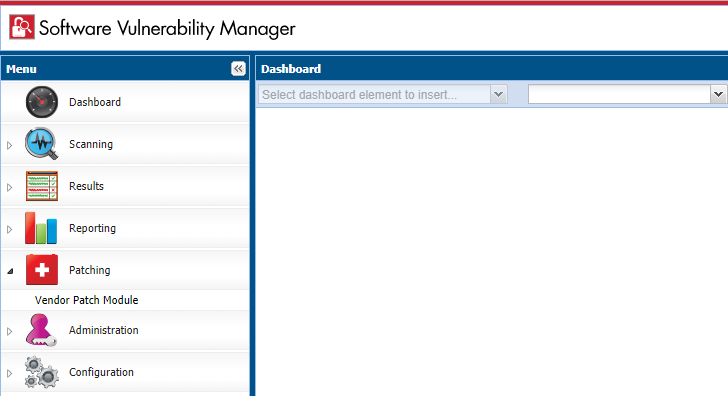
Cause
In order to have access to some menus like Patching, Active Directory, Quick Scan and System Center Inventory Import you need to download and install the SVM Plugin for Internet Explorer.
Resolution
Solution 1:
Download and install the SVM Plugin. If this is the first time you are using SVM on your machine then you need to download and install the SVM Plugin using the red download link on the bottom of the page.
Solution 2:
You are not using Internet Explorer. Currently, the Flexera SVM Plugin is only supported on Internet Explorer. To view Results and Reports you can use other browsers? if you would like to access Patching, Active Directory, Quick Scan and System Center Inventory Import you will need to open the Flexera SVM 7 in Internet Explorer.
Solution 3:
The SVM Plugin is installed but you are not running the latest version. After we have a maintenance release you will need to upgrade to the latest version of the SVM Plugin as well. To do that you can just re-download the plugin using the red download link on the bottom of the page.
Solution 4:
The SVM Plugin is not able to communicate with the Flexera backend. If the latest version of the SVM Plugin is installed, you are using Internet Explorer, and the Patching menu is still not displayed then the plugin might not be properly communicating with the Flexera backend. Add https://*.secunia.com into the Trusted Sites of the Internet Explorer configuration options. This is always a good thing to check.






Are you sure you want to cancel the case creation?
Are you sure you want to close this case
| Products | Region | Phone Numbers |
|---|---|---|
| FlexNet Operations FlexNet Embedded FlexNet Publisher FlexNet Connect FlexNet Code Insight InstallAnywhere InstallShield |
North America * |
+1 630-332-2513 (toll) +1 877-279-2853 (toll-free in North America) |
| Europe * |
+44 1925 944367 (toll) +44 800 047 8642 (toll-free in Europe) |
|
| Japan * | +81 3-4540-5335 (select option 2) | |
| Australia * |
+61 3 9895 2177 +61 1800 560 603 (toll-free in Australia) |
|
|
Usage Intelligence (formerly
Revulytics) Compliance Intelligence |
Please use the Case Portal to submit your support ticket or reach out to your Revenera contact. | |
Revenera Assistant


Case id: 00001065
Activity: Status change: 2 hours ago